DDEV v1.25.4 is here: 142 PRs from the entire DDEV community. Your suggestions, bug reports, code, and financial support made it possible.
The theme of this release is doing less by hand. A new project can start with a "seed" database you already have, and image and environment customizations can be set globally instead of in every project.
:::note[Linux and WSL2: new package repositories]
DDEV's apt and rpm packages are now published to Cloudsmith at packages.ddev.com. Gemfury (pkg.ddev.com) keeps working, so switch over whenever it suits you by re-running the Linux installation steps.
Package repository hosting is graciously provided by Cloudsmith. :::
Table of Contents
Database Seeding and Reset
Until now, a fresh project always started with an empty database, and getting your data back in there meant importing a dump or snapshot every time. DDEV can now automatically use a snapshot, which is far quicker than importing a SQL file.
ddev start --seed-snapshot=<name-or-path>fills a brand-new database from a snapshot in.ddev/db_snapshots, or from a path to one anywhere else on your machine. It works with MariaDB, MySQL, and PostgreSQL.seedis a reserved snapshot name. Runddev snapshot --name=seedonce, and from then on anyddev deletefollowed byddev startbrings that database back, with no flag to remember. You can even check.ddev/db_snapshots/seed*into Git if it's not annoyingly large.ddev start --reset-databasethrows the current database away and starts over, taking a snapshot first. The flags can be combined (works with bothddev startandddev restart):ddev start --reset-database --seed-snapshot=large-dataset --omit-snapshot.
There's more to snapshots in this release: sizes and database versions in ddev snapshot --list, snapshots shared across Git worktrees, and uncompressed snapshots for faster restores. See Snapshots for all of it.
MySQL 9.7 LTS Support
DDEV now supports MySQL 9.7, the latest LTS release:
# New project
ddev config --database=mysql:9.7
# Existing project
ddev utility migrate-database mysql:9.7
MySQL 8.0 and 8.4 also switched base images, from bitnamilegacy/mysql, which no longer receives updates, to Docker Hardened Images (dhi.io/mysql).
Global Configuration: Set It Once, for Every Project
If you've ever added the same company CA certificate, apt package, or API token to every project you work on, this release is for you.
Global Dockerfiles in ~/.ddev/web-build/ and ~/.ddev/db-build/ apply the same image customization everywhere: system tools, extra packages, or container-level SSL trust for curl, Composer, and Node.js, which used to be a per-project chore. A project overrides any of it with the same filename in its own .ddev/web-build/. Thanks to @rmott-littler.
Global env files ~/.ddev/.env and ~/.ddev/.env.<service> set environment variables for every project. Before this, the only global option was web_environment in ~/.ddev/global_config.yaml, which reaches the web container and nothing else. Now you can do it for db, or any other service:
# Set API_URL for the web service of every project
ddev dotenv global set .ddev/.env.web --api-url=https://example.com
Project env files gained two pieces in their names, too. A trailing .local, as in .ddev/.env.local, tells DDEV to gitignore the file, which is where credentials belong. A label, as in .ddev/.env.web.myaddon, keeps files from different sources apart, so an add-on isn't editing the same file you are.
New Project Types and Shopware 6 Without an Add-on
Two project types joined DDEV:
- Maho, thanks to @fballiano
- MODX Revolution 2.x and 3.x, thanks to @casparml
Shopware 6 projects now get shopware-cli right in the web image, along with ddev admin-watch, ddev storefront-watch, and the ports they need. The ddev-shopware-cli add-on isn't needed anymore. Thanks to @vanWittlaer.
New Commands and Flags
ddev add-on updateupdates the installed add-ons that are behind their latest GitHub release, with--dry-runto preview.ddev utility download-ddevfetches theddevbinaries for a PR, branch, commit, or tag without touching your installed DDEV, which is handy for testing a fix before it ships.ddev utility delete-volumeremoves one of a project's Docker volumes, for add-ons like ddev-solr that create their own.ddev launch --print-urlprints the URL instead of opening a browser, for SSH, containers, and CI, thanks to @steffenmaechtel.ddev tableproopens the project database in TablePro on macOS, thanks to @datlechin.
DDEV Tells You What's Wrong
A wrong docroot used to produce a bare 404/403 page with no hints about why. Now ddev-webserver explains the 403s and 404s it generates itself, and ddev-router does the same for a hostname that doesn't match any project:
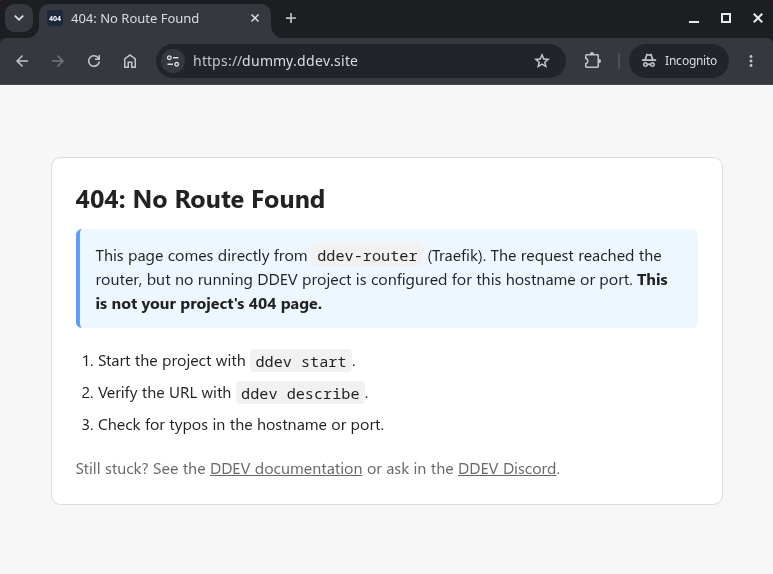
The page says where it came from, so you know it isn't your application's own 404, and it lists what to check. A 403 or 404 from your own application is passed through untouched.
It also replaces the old "docroot may be wrong" warning on ddev start, which you never saw in a browser and which sometimes fired when nothing was wrong.
Regressions from v1.25.3, Fixed
DDEV v1.25.3 introduced a few problems, and the ones you're most likely to have run into are resolved here:
- Project image builds are fast again. Permissions on the Node.js directory were being changed recursively on every build, and are now set once.
- Add-ons and applications that write log files straight into
/var/logcan do that again, after the directory was locked down to root only. - A site that generates its own
/robots.txtworks again. An Nginx rule was answering before your site could, and it's gone.
Other Fixes Worth Knowing About
ddev wprespects the path in your project's ownwp-cli.ymlagain, falling back to the docroot only when that file doesn't set one. Since v1.24.5 it always added--path=$DDEV_DOCROOT, which broke Bedrock and any layout where WordPress isn't in the docroot.- Running
ddevin a subdirectory with its own.ddev/config.yaml, such as a Drupal contrib module or a Git submodule, keeps using the outer project and tells you which one it picked, instead of switching silently and breaking the outer project's custom commands.ddev startthere asks first.
Performance Is Measured Automatically Now
A nightly benchmark harness now times ddev start, ddev stop, Mutagen sync-settle, and a Drupal install across the platforms and Docker providers DDEV already tests on, and publishes the results to a performance history dashboard, so a regression shows up as a bend in a trend line instead of a bug report months later. A second dashboard tracks CI test runtime.
Everything Else
This release includes many more features and bugfixes. See the full release notes for the complete list.
From the entire team, thanks for using, promoting, contributing, and supporting DDEV!
If you have questions, reach out in any of the support channels.
If you're amazed by how much is in this release, we are too! If you wonder how all this could be done, it's because of generous sponsors who let two of us work on this every day. If you and your team aren't already financially supporting DDEV, consider joining our sponsors.
Follow our blog, Bluesky, LinkedIn, Mastodon, and join us on Discord. Sign up for the monthly newsletter.
This article was edited and refined with assistance from Claude Code.