Image
微信内可能无法直接打开本站。请点右上角 ··· → 在浏览器打开,或复制链接。
RSS 官方收录 · 可信分层展示
Technical Blog Series Introduction The conversation at DrupalCon Rotterdam 2026 won't just be about what Drupal CMS 2.…
摘要引擎:抽取
The conversation at DrupalCon Rotterdam 2026 won't just be about what Drupal CMS 2.x can do — it will be about how teams are actually getting there. Migration is the real-world bridge between the platform you have today and the Recipe-driven, Canvas-powered experience covered in Post #1 of this series.
This post is a hands-on guide covering the three migration paths developers are navigating in 2026, the tools that power each one, and the common pitfalls that derail projects weeks or months into execution. We'll go deep on the Migrate API, look at real YAML definitions, and document the failure modes you're most likely to hit — along with their fixes.
"Migrating to Drupal CMS" covers three structurally different problems. The tools, timeline, and risk profile are different for each:
|
Your Current Platform |
Migration Type |
Primary Tooling |
|
Drupal 7 |
Data + platform upgrade |
Migrate API + Migrate Drupal |
|
Drupal 9 / 10 / 11 (classic) |
Layer adoption, no data move |
Recipes + Canvas adoption |
|
WordPress / Joomla / AEM / Sitecore |
Full platform replacement |
Migrate API + custom source plugins |
Knowing which one you're doing early — before scoping or quoting — is the single biggest factor in accurate estimation.
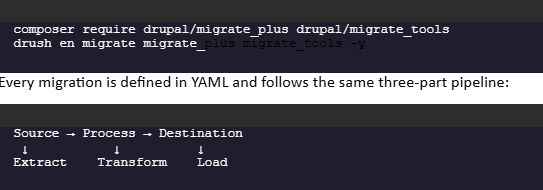
Regardless of source platform, Drupal's Migrate API is the ETL (Extract–Transform–Load) engine underneath every non-trivial migration. It lives in Drupal core and is composed of three module layers:
Install the contrib layer before anything else:
A source plugin reads rows from legacy data. Process plugins transform field values one by one. The destination plugin writes to Drupal entities. Understanding this pipeline is what separates developers who debug migrations quickly from those who spend days chasing phantom errors.
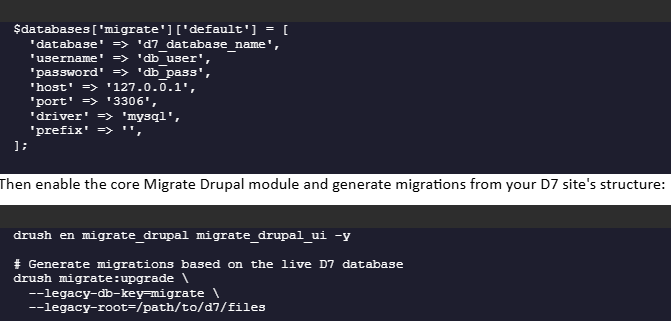
Drupal 7's end-of-community-life has passed, and commercial extended support windows are closing. If you're still running D7 in 2026, this migration is urgent — not optional.
Add the legacy database as a second connection in settings.php:

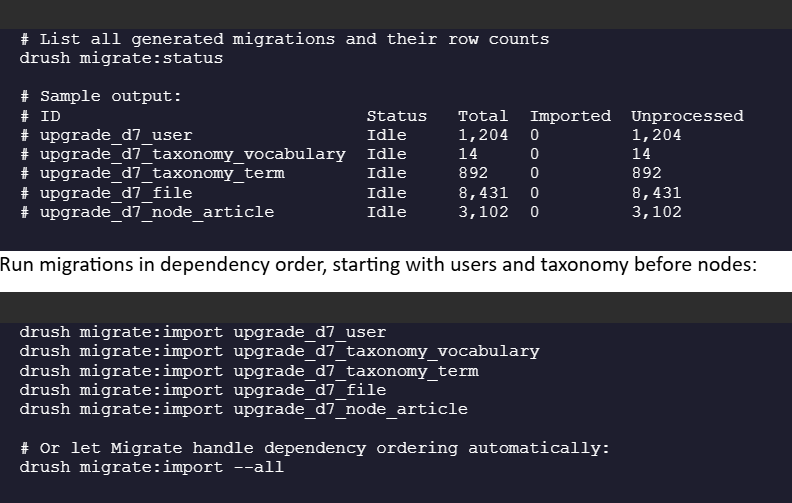
Inspecting the Generated Migrations
The upgrade command generates a full set of migration YAML definitions tailored to your D7 module footprint. Before running anything, inspect what was created:
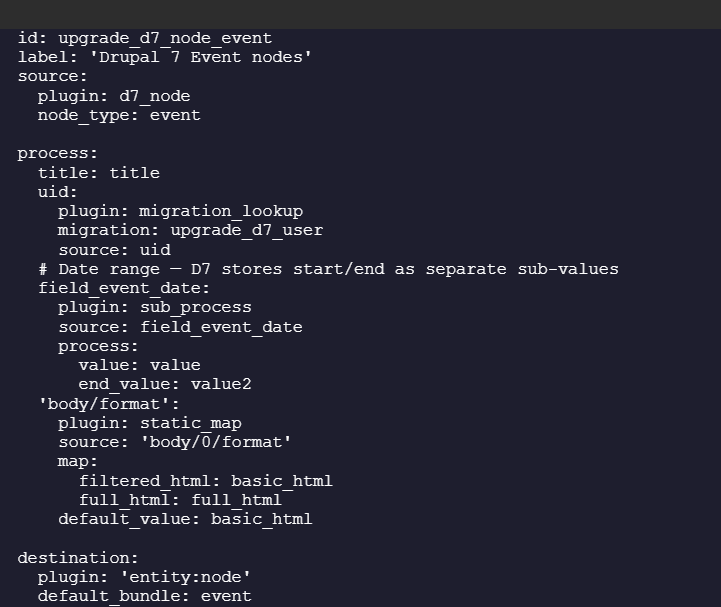
Writing a Custom Content Type Migration
Auto-generated migrations handle standard field types well. Custom CCK fields, computed values, or non-standard formatters need explicit YAML definitions. Here's a realistic example — a D7 Event content type with a date range field:

This is the most common scenario at agencies right now: modern Drupal running well, but built before Recipes and Canvas existed. There is no data migration here — your content stays exactly where it is. What you're adopting is a new site-building layer.



Because recipe config actions use createIfNotExists, this is safe on a live codebase — it will not overwrite your existing SEO or media configuration; it only fills in missing pieces.
This is where teams stall. If your current site uses Layout Builder or Paragraphs for page composition, official tooling to migrate into Drupal Canvas does not yet exist as of mid-2026. Your real options today:
Option C — Wait: If your site has thousands of Paragraphs-based pages, holding for official migration tooling may be the most pragmatic decision — a visible discussion at DrupalCon Rotterdam.
This is the highest-complexity path but increasingly common as organizations exit proprietary platforms for digital sovereignty and cost reasons.

This example extracts WordPress posts from a side-by-side MySQL database and loads them into Drupal CMS article nodes:
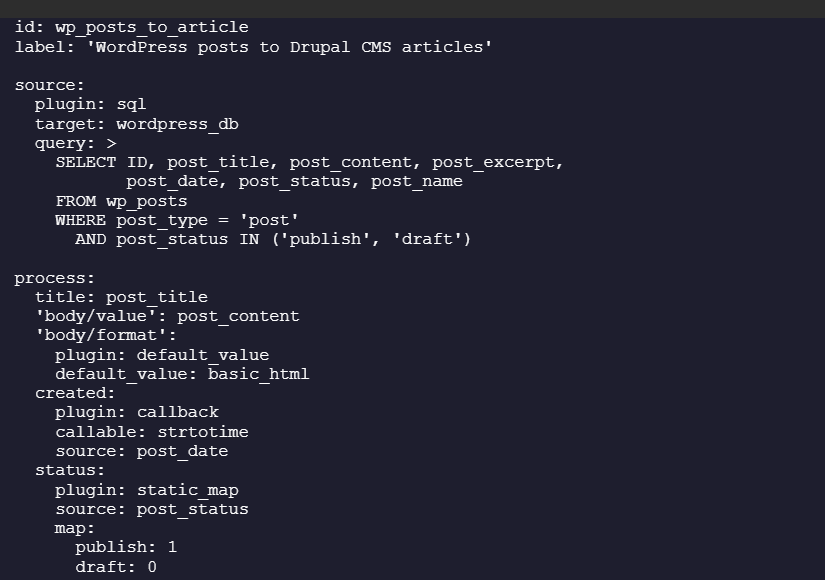
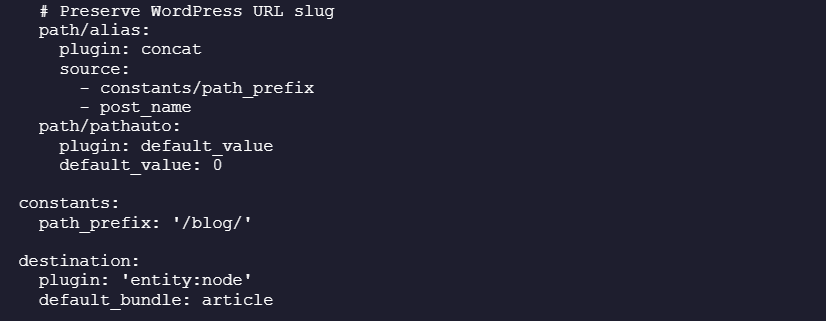
Media is where CMS migrations to Drupal quietly break — broken image paths and dead embedded media are among the most common post-launch complaints.
The problem: body content migrated as raw HTML still contains <img src="/wp-content/uploads/..."> paths referencing the old platform. Two strategies fix this:
Strategy A — Migrate files first, rewrite src attributes after
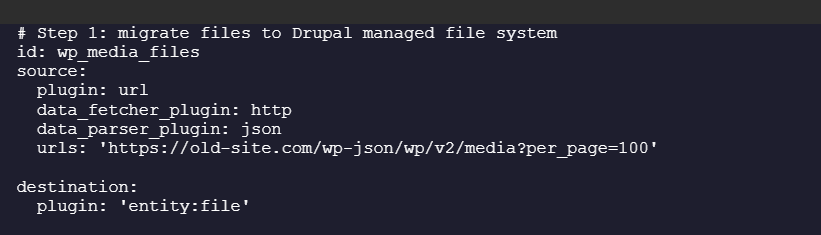
Strategy B — Use the file_import process plugin

Always run a dedicated media migration pass before your content migration, so file entities exist before nodes try to reference them.
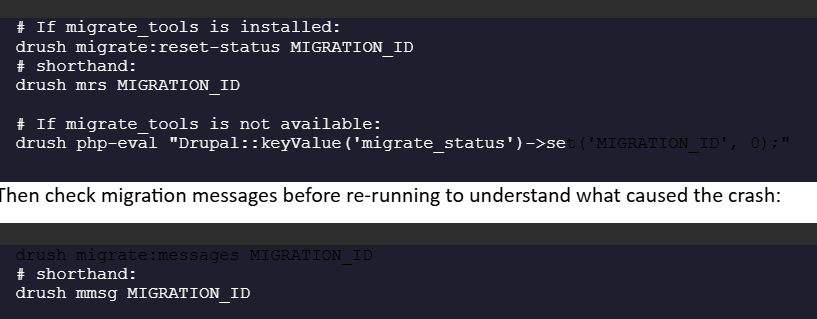
⚠ Pitfall 1 Migration is busy with another operation: Importing
The most frequently encountered Migrate API error. It happens when a migration process is killed mid-run (Ctrl+C, server timeout, PHP fatal) and the status lock isn't cleared.
The fix:
⚠ Pitfall 2 Skipping the Content Audit Phase
A reliable migration follows six stages: audit, content mapping, environment setup, content migration, media migration, and SEO preservation. Skipping a stage tends to resurface later as a launch-day fire drill.
A full pre-migration audit must cover:
⚠ Pitfall 3 Not Planning for Delta Migrations
Initial migration runs are never the final run. Between your first migration pass and go-live, editors will keep publishing on the old platform. You need a delta migration strategy — re-running migrations to pick up records created or updated after the initial pass.

⚠ Pitfall 4 Incorrect URL Alias Handling
After migration, old URLs may lead to 404 errors if not redirected correctly. Set up 301 redirects for old URLs to preserve SEO and user experience.
The pathauto module will regenerate URL aliases on save — which is exactly what you don't want post-migration if your old URLs had a different pattern. Disable Pathauto auto-generation on migrated content by setting path/pathauto to 0 in your migration YAML (as shown in the WordPress example above).

⚠ Pitfall 5 Migrating Roles and Permissions Too Early
If you migrate users before your Drupal CMS roles and permissions are fully configured, user role assignments land in the system referencing role IDs that either don't exist or have different permission sets than intended.
The correct order:
1. Configure roles and permissions on the destination site first
2. Export config with drush cex
3. Then run upgrade_d7_user or equivalent user migration
4. Verify a sample of migrated users have the expected roles before migrating content
⚠ Pitfall 6 Not Rolling Back Cleanly Between Test Runs
During development and testing, you'll run migrations many times. Not rolling back cleanly between runs leads to duplicate content, inconsistent map tables, and cascading lookup failures.
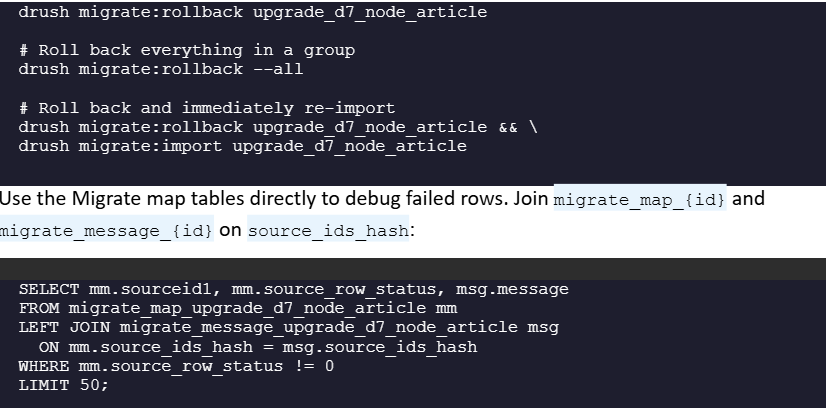
Beyond the technical tooling, the cutover strategy matters as much as the code. Three patterns dominate real-world projects:
|
Strategy |
Best For |
Key Characteristic |
|
Big Bang |
Smaller sites (<300 pages) |
Single cutover, maintenance window required |
|
Progressive |
Large content libraries |
Reverse-proxy routing, sections migrate gradually |
|
Hybrid (API Gateway) |
Regulated industries, complex integrations |
Drupal CMS as content hub, legacy systems via API |
Realistic timelines from field experience: small projects 6–12 weeks, medium-complexity 3–6 months, large enterprise migrations 6–12 months or more. These aren't conservative padding — they reflect what competent, well-resourced teams actually take when they don't skip the audit and planning phases.
This is the step migration guides most often omit. Migrate moves your content — it does not configure Drupal CMS's site-building layer. After your data migration validates cleanly, apply the relevant recipes:

Case studies from the Digital Sovereignty track — real migration stories from organizations exiting proprietary CMSs, with full technical detail
Migration to Drupal CMS 2.x is three different problems depending on where you start:
In every case, the six pitfalls covered in this post — stuck migration locks, skipped audits, missing delta runs, broken URL aliases, wrong sequencing of users and roles, and unclean rollbacks — account for the majority of timeline blowouts. Most of them are avoidable with upfront discipline.
← Post #1: Getting Started with Drupal CMS 2.x: Site Building with Recipes
→ Post #3: AI-Powered Drupal: Integrating LLMs and Agentic Architecture
Migration paths, Canvas tooling gaps, and the future of Migrate Drupal will all be live conversations in Rotterdam, 28 September – 1 October 2026.